2026-04-12 11:53 Tags:Technical Literacy
Hooks allow you to run commands before or after Claude attempts to run a tool. They’re incredibly useful for implementing automated workflows like running code formatters after file edits, executing tests when files change, or blocking access to specific files.
How Hooks Work
They let you intercept, modify, or observe what’s happening before/during/after a model runs.
User Input → [pre-hook] → Model → [post-hook] → Output
To understand hooks, let’s first review the normal flow when you interact with Claude Code. When you ask Claude something, your query gets sent to the Claude model along with tool definitions. Claude might decide to use a tool by providing a formatted response, and then Claude Code executes that tool and returns the result.
Hooks insert themselves into this process, allowing you to execute code just before or just after the tool execution happens.
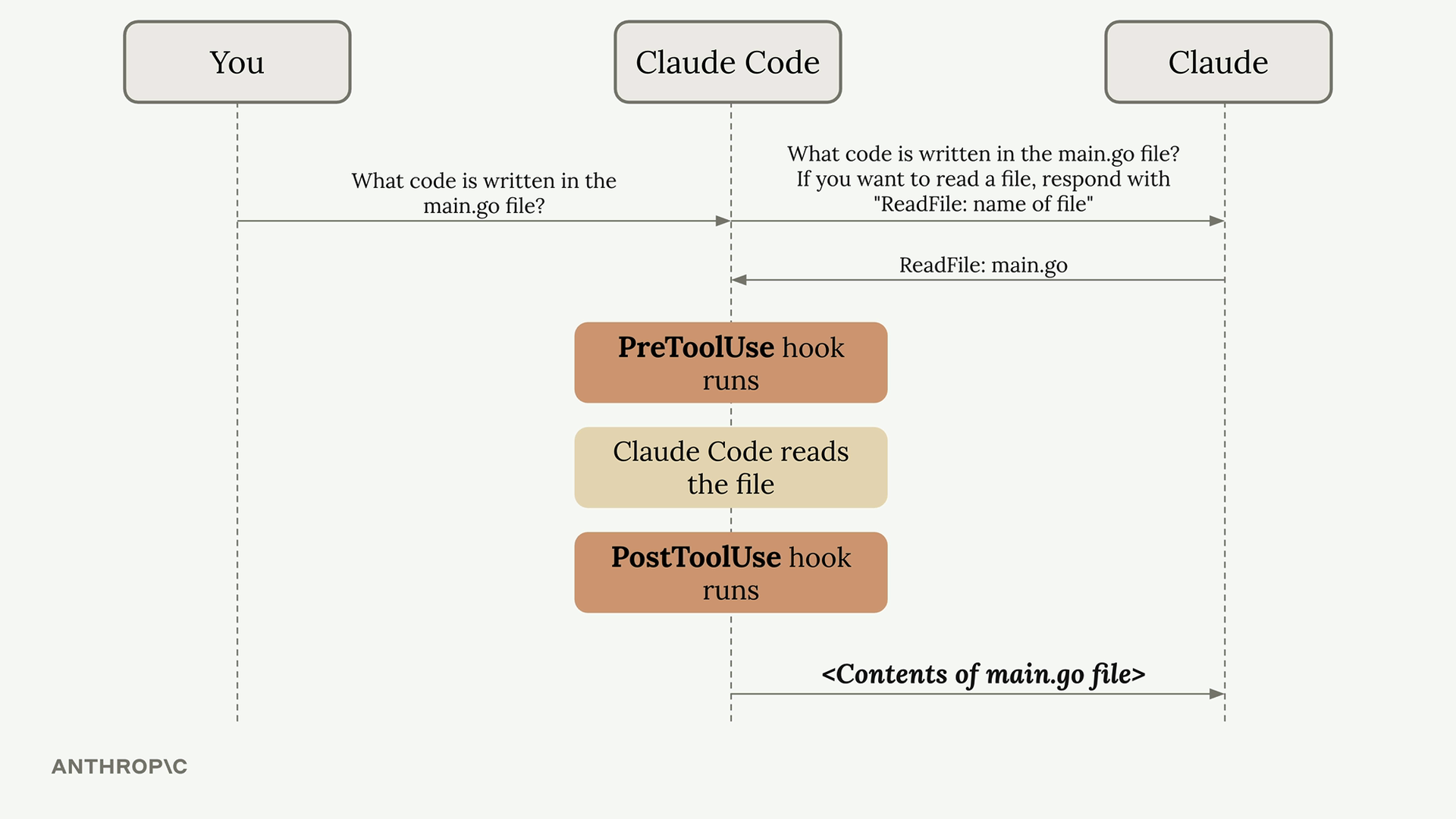
There are two types of hooks:
Pre-hooks — run before the model processes input
- Sanitize or modify the prompt
- Add context or memory
- Check for policy violations
Post-hooks — run after the model generates output
- Filter or reformat the response
- Log the interaction
- Trigger follow-up actions
Hook Configuration
Hooks are defined in Claude settings files. You can add them to:
- Global -
~/.claude/settings.json(affects all projects) - Project -
.claude/settings.json(shared with team) - Project (not committed) -
.claude/settings.local.json(personal settings)
You can write hooks by hand in these files or use the /hooks command inside Claude Code.
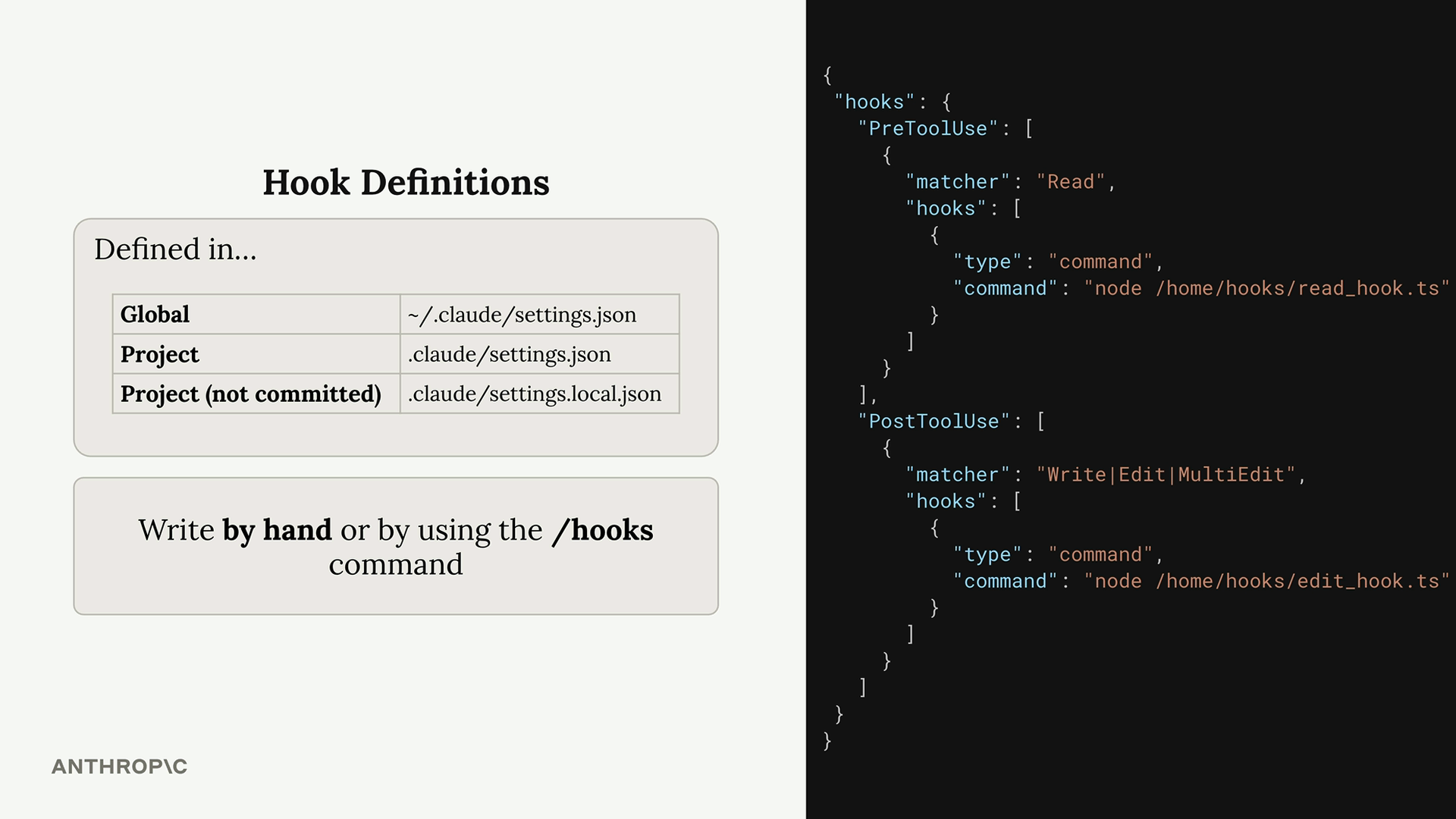
The configuration structure includes two main sections:

PreToolUse Hooks
PreToolUse hooks run before a tool is executed. They include a matcher that specifies which tool types to target:
"PreToolUse": [
  {
    "matcher": "Read",
    "hooks": [
      {
        "type": "command",
        "command": "node /home/hooks/read_hook.ts"
      }
    ]
  }
]
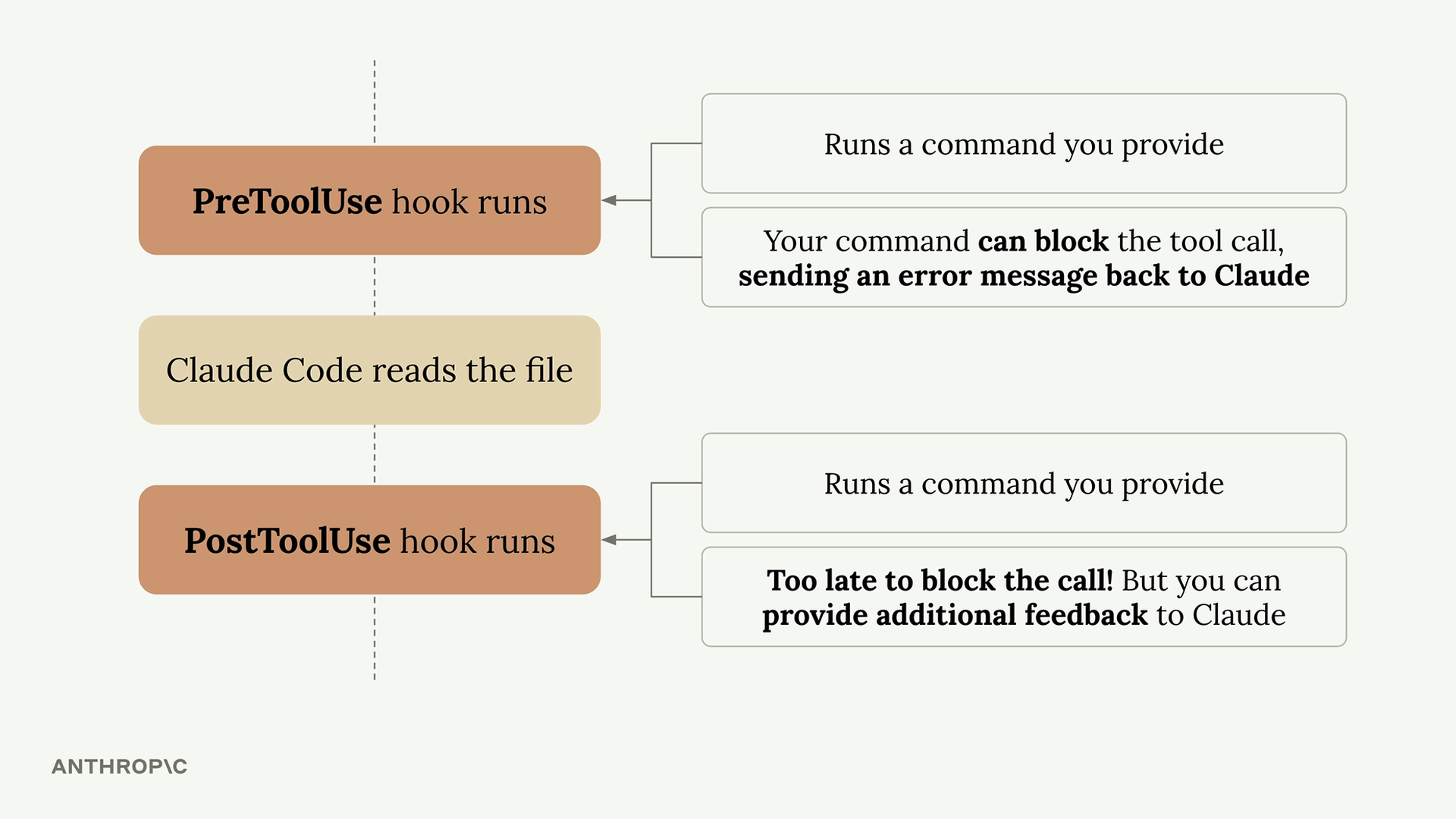
Before the ‘Read’ tool is executed, this configuration runs the specified command. Your command receives details about the tool call Claude wants to make, and you can:
- Allow the operation to proceed normally
- Block the tool call and send an error message back to Claude
PostToolUse Hooks
PostToolUse hooks run after a tool has been executed. Here’s an example that triggers after write, edit, or multi-edit operations:
"PostToolUse": [
  {
    "matcher": "Write|Edit|MultiEdit",
    "hooks": [
      {
        "type": "command",
        "command": "node /home/hooks/edit_hook.ts"
      }
    ]
  }
]
Since the tool call has already occurred, PostToolUse hooks can’t block the operation. However, they can:
- Run follow-up operations (like formatting a file that was just edited)
- Provide additional feedback to Claude about the tool use
Practical Applications
Here are some common ways to use hooks:
- Code formatting - Automatically format files after Claude edits them
- Testing - Run tests automatically when files are changed
- Access control - Block Claude from reading or editing specific files
- Code quality - Run linters or type checkers and provide feedback to Claude
- Logging - Track what files Claude accesses or modifies
- Validation - Check naming conventions or coding standards
The key insight is that hooks let you extend Claude Code’s capabilities by integrating your own tools and processes into the workflow. PreToolUse hooks give you control over what Claude can do, while PostToolUse hooks let you enhance what Claude has done.
Great question. The core reason is:
AI models are stateless black boxes — hooks give you control around them.
The problem without hooks:
When you call an LLM, it just takes input and returns output. That’s it. But in real applications you need to do a lot more:
What if the user sends harmful content?        → you need to check BEFORE sending
What if the response is in the wrong format?   → you need to fix AFTER receiving
What if you want to log every call?            → you need to observe DURING
What if costs are too high?                    → you need to count tokens BEFORE
Without hooks, you’d have to manually wrap every single LLM call with that logic, scattered everywhere in your code.
With hooks — you define it once:
# Define once
def pre_hook(prompt):
    check_safety(prompt)      # always runs
    inject_memory(prompt)     # always runs
    count_tokens(prompt)      # always runs

# Every LLM call automatically gets all of this
The real analogy:
Think of it like airport security. You don’t check each passenger individually with custom rules each time. You build checkpoints that every passenger passes through automatically.
Hooks = checkpoints in your AI pipeline.
So we define them because:
- Separation of concerns — your AI logic stays clean, cross-cutting concerns (logging, safety, memory) live in hooks
- Reusability — write once, applies everywhere
- Maintainability — change behavior in one place, not 100 places
- Observability — you can’t debug what you can’t see